BCBSIL
- 4.4
- Rating
- 500.00K
- Installs
- Free
- Price

 Analysis by App-foxy
Managing health insurance is rarely something I want to do for fun, but it becomes much easier when the information I need is available in one focused place. BCBSIL is a free medical app from Blue Cross and Blue Shield of Illinois built around member information, and that purpose shapes both its strengths and its limits. In my experience, it is most useful as a practical companion for people who already have BCBSIL coverage and want a quicker route to their plan details than searching through paperwork or a browser.
My overall view is straightforward: this is a focused member-service tool rather than a general health app. It will not replace a doctor, a pharmacy app, or a full personal health record, but it can reduce the small frustrations that come with checking insurance information. The app has earned a 4.5 average from about 5.1 thousand ratings, with more than 500 thousand installs, which suggests that many members find the basic experience worthwhile.
What the app is really good at
The strongest part of BCBSIL is its narrow purpose. Instead of trying to combine exercise tracking, symptom searches, medication reminders, and wellness content, it concentrates on the relationship between a member and an Illinois Blue Cross and Blue Shield plan. That makes the app easier to understand when the task in front of me is insurance-related rather than medical.
You May Also Like

 Blood Strike: 2.5 Anniversary
Blood Strike’s Loadouts Turn Every Drop Into a Tactical Gamble
A close look at Blood Strike’s custom loadouts: how fast access to signature weapons reshapes its battle royale rhythm, rewards preparation, and narrows the gap between fights.

 Pandora - Music & Podcasts
Pandora’s Music Is Easy to Start, but Harder to Recover
Pandora’s strength is its low-effort path from a seed to a station. Its weak spot is how much confidence it asks you to place in connection, setup, and quiet recovery.

 8 Ball Pool
 Is Built on Rivalries, Rematches, and Routine
A close look at the rivalries, rematches, shared routines, and unanswered safety questions that turn a quick pool match into a persistent mobile community.

 Samsung Music
’s Quiet Strength Is Playing What You Already Own
Its reach comes less from spectacle than from dependable access to a personal library. That simplicity is both the app’s strongest retention engine and its ceiling.

 AccuWeather: Weather Radar
AccuWeather Review: A Quick, Clear Forecast for Everyday Decisions
For everyday plans, the best forecast is the one you can understand quickly. AccuWeather makes rain timing, radar, and local conditions easy to act on, with a few trade-offs.

 Hill Climb Racing
Why Hill Climb Racing Still Turns Crashes Into One More Run
A tiny car, a bumpy hill and one more upgrade: Hill Climb Racing keeps resurfacing because its simple chaos makes every near-miss feel personal.
More From Our News Desk



For example, imagine I am at a clinic reception desk and need to confirm information connected with my coverage. Pulling out a paper card can be awkward, especially if I have changed bags or left my wallet elsewhere. A member-focused app can be more convenient in that moment because the information is organized around the insurance account instead of being mixed with unrelated health features. I would still check the details carefully before treatment, but having a digital starting point is useful.
The same applies when I am arranging care for a family member, reviewing a bill, or trying to understand which part of my coverage I need to ask about. The value is not that the app turns a complicated insurance system into something simple; rather, it gives me a more direct place to begin. That distinction matters. Insurance questions often require exact wording, and a dedicated member app is generally more practical than a general search engine result.
Another strength is the app’s audience clarity. Because it is published by Blue Cross and Blue Shield of Illinois, it is not presenting itself as a universal insurance directory. The developer’s identity makes the intended user obvious: this is for BCBSIL members. That clarity is helpful when several insurance apps look similar in a crowded store.
The app is categorized as a medical app, but I would treat that label carefully. It is medical in the sense that it supports access to health coverage information, not because it offers diagnosis or clinical judgement. I would not use it to decide whether a symptom is serious, choose a treatment, or replace advice from a qualified professional. Its job is administrative and informational, and it performs best when I use it that way.
Useful habits that make member apps less frustrating
One practical habit is to open the app before I am standing at a counter or speaking with a provider. Insurance questions become more stressful when I am already under time pressure. Checking the account while I am calm gives me a chance to notice whether I can find the information I need and whether my sign-in details work. This is a simple step, but it prevents the app from becoming something I only try for the first time during an appointment.
I also find it helpful to separate three different tasks: confirming membership information, understanding what a plan may cover, and resolving a claim or billing problem. A member app may help me start all three, but they are not the same question. If I confuse them, I can waste time looking for a benefit explanation when I actually need to contact a provider’s billing office. Using the app as an organized doorway rather than expecting one screen to answer everything is a better approach.
A second useful workflow is to keep questions ready before contacting support through any available member-service route. Instead of opening the app with a vague concern, I would note the provider name, appointment date, bill reference, or wording that seems unclear. That preparation makes the information in the app more useful because I can compare what I see with the specific issue I am trying to solve.
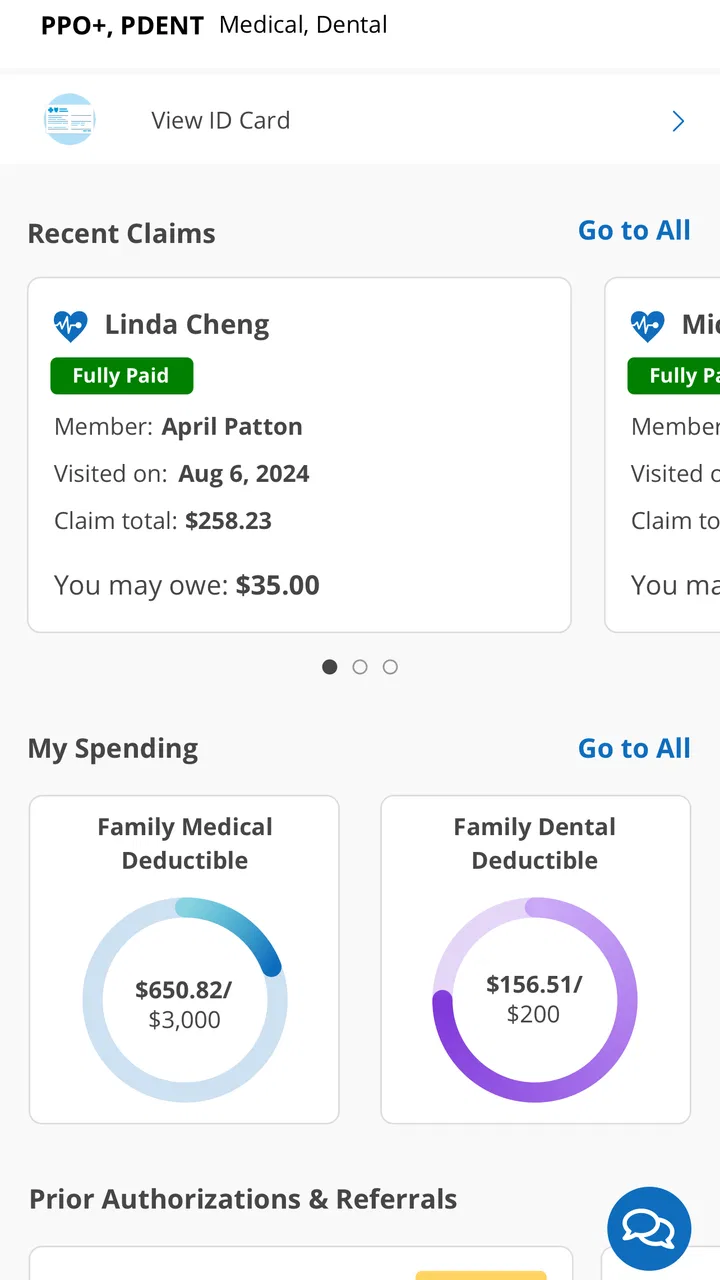
There is also a subtle trade-off between convenience and interpretation. Seeing member information on a phone does not automatically explain every insurance term. Words connected with deductibles, networks, claims, and authorizations can still be confusing. I would use the app to locate the relevant information, then ask BCBSIL or the provider for clarification when the financial consequence matters. A digital display is helpful, but it should not encourage overconfidence.
Where the focused design helps most
BCBSIL makes the most sense for routine moments that happen between appointments. I might want to check something while planning a visit, preparing for a procedure, or reviewing a recent healthcare expense. These are situations where a member-oriented tool can save time compared with digging through an email inbox or trying to remember where a physical document was stored.
It can also be useful for people who are new to managing their own healthcare. Younger adults moving onto their own plan, older users helping a spouse, or anyone who has recently changed providers may appreciate having member information gathered in a familiar mobile format. The app does not remove the need to learn how insurance works, but it can make the first step less intimidating.
For caregivers, the benefit depends on whose account is being managed and how access is handled. I would not assume that one person can freely view another member’s information simply because they are related. Anyone using the app for a spouse, child, or parent should pay attention to the account and authorization arrangements involved. That is an important real-world consideration, because convenience should not come at the expense of privacy or accuracy.
The important limitations before downloading
The biggest weakness is also the app’s defining boundary: it is only a strong choice for people connected to Blue Cross and Blue Shield of Illinois. If I use another insurer, BCBSIL is not a general-purpose insurance manager. Downloading it out of curiosity will not make it useful, and people comparing plans should not mistake a member app for an independent tool that explains every carrier’s coverage.
I would also avoid expecting it to behave like a complete personal health record. A health record app may be better for organizing lab results, vaccination details, appointments, or information from several providers. A pharmacy application may be better for prescription refills and medication reminders. A general wellness app may offer tracking tools that are outside the purpose of BCBSIL. Choosing between them depends on the job I need done, not on which app has the broadest category label.
Insurance information can change in ways that are difficult to summarize on a phone. A provider may be listed in a network but still require a particular authorization for a service. A claim may be processed differently from what I expected. A benefit may depend on the details of the plan and the circumstances of care. Because of that, I would treat the app as a convenient reference point, not as a guarantee that a treatment will have a particular final cost.
There is a second kind of friction that affects nearly every account-based service: access. If I forget login details, change phones, or encounter a problem while away from home, the app cannot be more useful than my ability to reach the account. I would make sure my account information is current and avoid waiting until an urgent appointment to discover that I need to recover access. That is not a criticism unique to this app, but it is especially relevant when the information is needed at a medical office.
The app’s age also gives it an interesting perspective. BCBSIL was released on December 17, 2010, so it has been around long enough to be an established member-service product rather than a brand-new experiment. Its current version is 7.17.0, and it supports operating systems from version 9 onward. That broad compatibility is helpful for people who do not upgrade phones frequently, although compatibility alone does not guarantee that every device will feel equally modern or responsive.
I would also keep expectations realistic about the difference between a mobile interface and a desktop browser. A phone is excellent for quick checks, but a larger screen can be more comfortable when reading lengthy explanations, comparing several pieces of information, or working through a complicated billing issue. If the task involves careful review rather than a quick lookup, the usual web or phone-support alternative may be easier.
Who should use it, and who should choose something else
I would recommend BCBSIL first to current Blue Cross and Blue Shield of Illinois members who want their insurance information available in a mobile format. It is especially suitable for people who frequently move between appointments, want a convenient reference when speaking with providers, or prefer not to rely on paper documents. Since the app is free and rated for Everyone, the barrier to trying it is low, provided the user actually belongs to the intended member group.
It is also a sensible option for someone who values a focused interface over a collection of unrelated health tools. I would rather use a dedicated member app for coverage-related tasks than sort through a wellness platform that treats insurance as an afterthought. The narrower scope can feel like a weakness if I want an all-in-one health dashboard, but it becomes an advantage when I need member information without distractions.
I would skip it if I am looking for medical advice, symptom triage, fitness tracking, medication management, or a single record that combines several insurers and healthcare systems. In those situations, a clinician, pharmacy service, provider portal, or broader health-record solution will usually be a better fit. I would also skip it if I am not a BCBSIL member, because the app’s usefulness is tied to that specific insurance relationship.
People who dislike account-based mobile services may prefer keeping documents in a secure personal system and contacting the insurer directly. That approach can be slower for quick checks, but it may feel more comfortable for users who prefer a computer, phone call, or printed records. The best choice depends on whether immediate mobile access is genuinely valuable in daily life.
Questions I would settle before relying on it
One question is whether the app can replace an insurance card. I would not make that assumption. Even if member information is available digitally, a clinic may have its own process, and some situations still call for the physical card or exact details from the account. I would keep a backup method available until I know how the providers I use handle digital information.
Another question is whether the app can tell me exactly what I will pay. I would use it to understand my member information and investigate coverage-related details, but I would not treat any general display as a final promise about a bill. Costs can depend on the provider, service, network status, authorization, and claim processing. When the amount matters, I would verify it with the insurer and the healthcare provider.
Users may also wonder whether it is suitable for emergencies. My answer is no: an insurance app should not be the first tool for a medical emergency. I would seek urgent medical help through the appropriate emergency service, then deal with insurance administration afterward. The app is for member information, not immediate clinical decisions.
Finally, I would ask whether it is worth installing if I only need insurance information occasionally. For me, the answer depends on how often I misplace documents or need details away from home. If those moments happen even a few times a year, having a dedicated app ready can justify the small effort of setting it up. If I rarely use mobile services and already have an organized, secure way to access my plan information, the benefit may be modest.
My final recommendation
After looking at what BCBSIL is designed to do, I see it as a practical utility rather than a complete healthcare companion. Its best quality is focus: it gives BCBSIL members a mobile route to information connected with their coverage, without pretending to be a diagnostic or wellness platform. That makes it easy to recommend to the right audience and equally easy to reject for everyone else.
The limitations are meaningful, but they are not deal-breakers when expectations are set correctly. I would not use it as my only source for medical decisions, assume it guarantees a final treatment cost, or expect it to replace every provider and pharmacy tool. I would use it before appointments, during ordinary insurance questions, and as a backup to more traditional member-service options.
For eligible members, the free price makes trying it reasonable, and its long availability plus current version suggest an established product rather than a temporary experiment. My recommendation is therefore positive but specific: install it if you are a BCBSIL member who wants faster access to insurance information on your phone. If your goal is broader health management, choose a tool built for that job instead. BCBSIL succeeds because it stays close to its purpose, and that is exactly how I would judge it.
FAQs for BCBSIL
01What is the BCBSIL app used for?
The BCBSIL app is designed to provide users with easy access to their Blue Cross and Blue Shield of Illinois health insurance information. It allows users to view claims, find doctors and hospitals, access digital ID cards, and manage their healthcare plans efficiently. The app is a convenient tool for staying informed about your health benefits.
02Is the BCBSIL app free to download and use?
Yes, the BCBSIL app is free to download on both Android and iOS devices. There are no additional charges for using the app's core features. However, standard data charges from your mobile carrier may apply when accessing the app over a cellular network.
03Can I use the BCBSIL app to file claims?
Yes, the BCBSIL app allows users to view and manage claims. While you cannot file new claims directly through the app, you can track the status of existing claims and understand the details related to each claim. This feature helps you stay updated on the processing of your healthcare claims.
04How secure is my personal information on the BCBSIL app?
The BCBSIL app employs robust security measures to protect your personal and health information. It uses encryption and secure login protocols to ensure that your data remains confidential. Users are encouraged to use strong passwords and enable biometric authentication for added security.
05What devices are compatible with the BCBSIL app?
The BCBSIL app is compatible with most modern Android and iOS devices. It requires Android version 5.0 or later and iOS version 11.0 or later. Users should ensure their devices are updated to meet these requirements for optimal performance and access to all features.
Pros
- User-friendly interface for easy navigation.
- Comprehensive coverage details available.
- Real-time claim updates and tracking.
- Convenient digital ID card access.
- Secure messaging with customer support.
Cons
- Limited offline functionality.
- Occasional login glitches reported.
- Doesn't support all policy types.
- No direct payment options in-app.
- Limited customization of notifications.

BCBSIL
Gallery